

Modern brand identity is no longer just about a well-designed icon; it’s about how that icon moves, breathes, and interacts with a viewer’s scroll. While static logos serve their purpose on business cards, the digital space demands kinetic energy to stop the thumb. High-quality motion graphics have traditionally required expensive software and hours of keyframe manipulation. However, the arrival of FlexClip AI Logo Animation aims to democratize this process, offering a high-speed, automated solution for turning flat brand assets into professional-grade motion identities.
This review evaluates the tool’s effectiveness in animating brand logos while maintaining visual consistency and high-fidelity output.
Deep Dive: The Precision of FlexClip AI Logo Animation
The flexclip AI Logo Animation feature is an intelligent motion engine designed to ingest static image files—such as PNGs, JPEGs, or SVGs—and reconstruct them into dynamic video intros. Unlike basic transition effects, this AI analyzes the elements of your logo to apply smart entrance and exit animations that feel custom-made.
In our testing, the AI demonstrated a sophisticated understanding of transparency and layering. It doesn’t just “slide” the image onto the screen; it offers a variety of styles from sleek, minimalist reveals to high-energy cinematic bursts. For businesses looking to add a professional touch to their YouTube intros or social media teasers, this tool effectively removes the need for manual animation work. The transition from a “flat” icon to a “living” brand asset is remarkably seamless.
Evaluating Efficiency: The Power of Auto-Animation
The true efficiency of the flexclip AI Logo Animation tool is found in its integrated template library and automation features. Beyond simple movement, the tool addresses the most time-consuming aspects of motion design:
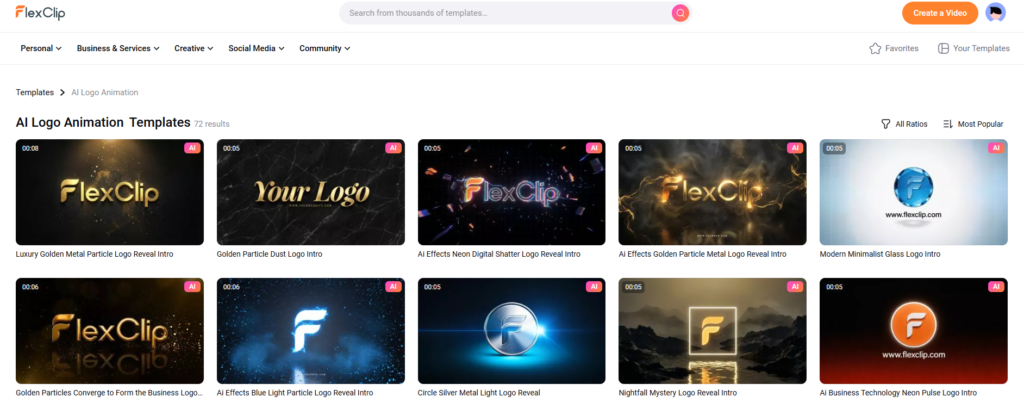
- Style Matching: The AI offers curated animation styles that can be matched to your brand’s personality, whether it’s corporate, playful, or high-tech.
- Audio Synchronization: It provides a library of sound effects and logo “idents” that are automatically timed to match the visual reveal, ensuring the final asset feels cohesive.
- One-Click Customization: Once the initial animation is generated, you can instantly adjust the background, lighting effects, and duration without restarting the project.
The flexibility of these features allows for rapid content iteration. A single logo can be animated in five different ways in minutes, providing multiple options for different marketing platforms.
Combined Performance: FlexClip AI Logo Animation in Workflow
The impact of flexclip AI Logo Animation is most significant when integrated into a broader content production workflow. A standard sequence might look like this:
- Ingestion: Uploading your high-resolution logo file to the FlexClip cloud.
- AI Selection: Choosing an animation style that aligns with your specific video campaign.
- Refinement: Using the full FlexClip editing suite to add brand colors, custom music, or overlay text to finalize the intro.
This workflow demonstrates a massive reduction in production time—transforming a task that traditionally required a motion designer into a simple 5-minute refinement process for a marketing assistant. Once you have this polished intro, you can scale your production further by pairing it with other assets. For instance, you can drop your newly animated brand mark straight into slide presentations converted via FlexClip AI PPT to Video, instantly turning a standard deck into a cohesive, branded video asset.
Verdict
The integration of flexclip AI Logo Animation represents a significant shift in how brands handle their visual assets. The tool excels at maintaining the balance between automated speed and creative control. While the AI handles the complex physics of the animation, it keeps the project fully editable for the user. For businesses needing to professionalize their video output without expanding their design budget, this tool is an indispensable foundation for a modern digital strategy.
The flexclip AI Logo Animation tool is just one of the many powerful features within the FlexClip ecosystem. If you’re interested in exploring the platform’s full suite of tools—including its AI video generator, automated subtitling, and cloud-based editing suite—we recommend checking out our full FlexClip review.
We provide a deep dive into the platform’s performance, pricing, and how it stacks up against other professional editing software to help you determine if it’s the right fit for your creative workflow.