

In the modern digital landscape, the speed at which you can pivot content determines your market relevance. For entrepreneurs and marketing teams, the hurdle isn’t creating the information—it’s the exhaustive labor required to turn a static deck into a high-impact video. FlexClip AI PPT to Video enters this space as a specialized solution designed to bridge the gap between “presentation” and “production.”
This review explores how the tool functions as an automated production suite, focusing on its ability to preserve brand integrity while maximizing output speed.
What is FlexClip AI PPT to Video?
FlexClip AI PPT to Video is a dedicated AI-powered converter that transforms PowerPoint and PDF files into fully editable video projects. Rather than simply capturing a screen recording, the AI deconstructs the file to build a layered project, allowing for granular control over every element.
Key Features Breakdown
The core value of this tool lies in its ability to automate the technical barriers of video editing:
- Intelligent Layout Analysis: It recognizes the hierarchy of your slides. By identifying text blocks and imagery, it creates a logical flow that feels like a custom-made video rather than a converted file.
- Narrative Automation: One of the standout features is its ability to generate scripts from speaker notes. This is paired with an AI voice engine featuring 400+ voices, eliminating the need for manual voice recording.
- Multi-Language Localization: With support for over 140 languages, you can take a single English presentation and instantly generate localized versions for international audiences.
- Cloud-Based Editing Suite: After the AI does the initial work, you have access to a full timeline editor to add overlays, stock media, and custom animations.
Who is FlexClip AI PPT to Video For?
This tool is a strategic fit for:
- Sales Professionals: Turning pitch decks into personalized video messages.
- Educators & Trainers: Converting long-form PDFs into bite-sized video modules.
- Marketing Agencies: Rapidly repurposing client presentations for social media teasers.
Evaluating Efficiency: The Power of Auto-Conversion
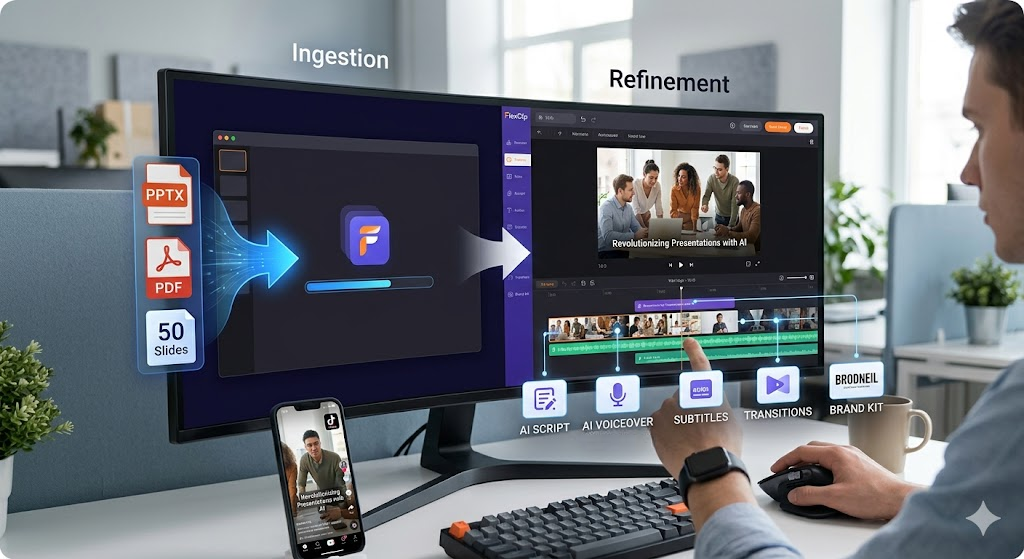
The true efficiency of the FlexClip AI PPT to Video tool is found in its integrated automation features. Beyond simple file conversion, the tool addresses the most time-consuming aspects of video production:
- Automated Scripting & Voiceover: The AI reads speaker notes and on-slide text to generate a coherent script. With access to over 400 lifelike AI voices in 140+ languages, it provides a high-quality narration layer without the need for a recording studio.
- Intelligent Subtitle Generation: It offers one-click auto-captions, ensuring the final video is optimized for the “sound-off” viewing habits of social media users.
- Sync-Aware Transitions: The tool automatically applies smooth transitions and timing that match the pace of the generated audio, ensuring the visual flow feels natural.
The flexibility of these features allows for rapid localization. A single English deck can be converted into multiple localized videos in minutes, making it a critical asset for global marketing teams.
Combined Performance: FlexClip AI PPT to Video in Workflow
The impact of FlexClip AI PPT to Video is most significant when integrated into a professional content workflow. A standard sequence might look like this:
- Ingestion: Uploading a 50-page PDF or PPTX file to the FlexClip cloud.
- AI Generation: Allowing the AI to generate the initial video draft, complete with transitions and voiceovers.
- Refinement: Using the full FlexClip editing suite to add logos, brand colors, and stock media from their library of 4 million assets.
This workflow demonstrates a massive reduction in production time—transforming a task that traditionally took a full day into a 15-minute refinement process.
Performance & Findings: Why It Works
The efficiency of FlexClip AI PPT to Video is rooted in its “intelligent” approach to content. In professional settings, the greatest time-sink is usually synchronization—matching the visual slide change to the spoken word. The AI handles this alignment automatically.
In practice, this means the user moves from “creator” to “editor-in-chief.” Instead of spending hours on a timeline, you spend a few minutes refining the AI’s suggestions, ensuring the brand voice is perfect before exporting.
A Balanced Review: Pros and Cons
Pros:
- Drastic Time Savings: Reduces a day’s worth of editing into a few minutes of refinement.
- High-Quality Audio: The AI voices are sophisticated enough to be used in professional marketing without sounding robotic.
- Accessibility: One-click auto-captions ensure the video is ready for social media’s “sound-off” environments.
Cons:
- File Limits: Large presentations (over 50 slides) may require being broken down into smaller segments for processing.
- Niche Context: While the AI is smart, highly technical jargon may require a quick manual review of the generated script for accuracy.
Polishing Your Output with Professional Branding
Converting a slide deck into a video handles the heavy lifting of content structure and voiceovers, but the final file can still look raw without cohesive brand assets. To prevent your converted presentations from looking like generic templates, you should bookend them with custom brand intros.
By pairing your presentation drafts with FlexClip AI Logo Animation, you can instantly transform a static company logo into a high-quality motion graphic. Dropping this animated brand asset into the first few seconds of your newly converted slide video establishes instant authority and visual consistency.
The Verdict
The integration of FlexClip AI PPT to Video represents a significant shift in content strategy. It moves away from the idea that high-quality video requires a massive time investment. By automating the repetitive tasks of timing and narration, it allows creators to focus on the strategy behind the content. For any business looking to scale their video presence without increasing their overhead, this tool is a necessary addition to the digital toolkit.
For a full breakdown of the user interface, additional AI features, and all available video editing capabilities, we recommend reading our detailed FlexClip review. It successfully bridges the gap between sophisticated editing requirements and the increasing demand for fast, scalable content output.